AI TOOL / #03900
AiAsk Summary
A Chrome extension tool that extracts article outlines to improve reading and research efficiency.
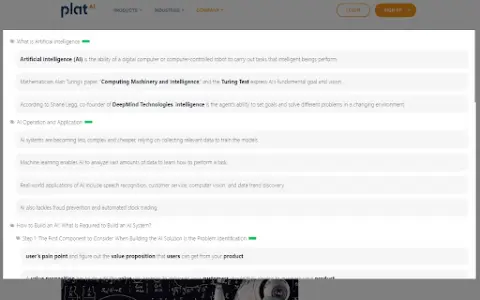
Introduction
Chrome extension that extracts outlines from articles for enhanced reading and research.
What is the AiAsk Summary AI Chrome extension/plugin?
AiAsk Summary is a Chrome extension designed to enhance your reading and research experience. It cleverly extracts the main outline of any article you browse, providing a structured overview of its content.
How do I use the AiAsk Summary AI Chrome extension/plugin?
1. Browse: Open any article in the Chrome browser.
2. Activate: Click the icon in the browser toolbar or the icon on the right side of the page.
3. Extract: This extension analyzes the article and displays a concise outline.
Core features of the AiAsk Summary AI Chrome extension/plugin
Automatic outline generation
User-friendly interface
Improve reading efficiency
Supports YouTube videos
Show detailed content when the outline is ready.
Related
Morphik
An open-source AI knowledge base and research platform, specifically designed for enterprise data analysis needs.
Noam – ChatGPT translate assistant & Deep Translation
An AI translation plugin designed for the translation of immersive web content.
Archer – AI-powered math tutor
An AI-based math tutoring tool that enables personalized learning.
PDFToQuiz
AI-based platform that converts PDFs, URLs or text into interactive quizzes.
Training OS
A fast, easy-to-use AI-powered tool for creating presentations, documents, and web pages.
Teddy AI
A conversational artificial intelligence learning partner designed for children, making the learning process fun and interactive.