AI TOOL / #04050
AI Roundtable
Ask a question and receive answers from multiple AI assistants.
Introduction
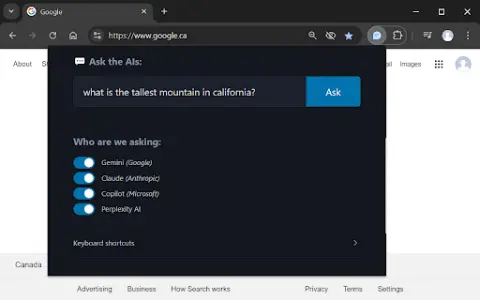
Ask one question, get answers from multiple AI assistants.
What is a Multiple AI Assistants Chrome extension/plug-in?
This website allows users to submit questions at once and receive answers from multiple AI assistants. Users can customize which assistant they want to use for their queries. The website also provides keyboard shortcuts, making it easy to access various functions quickly.
How to use the Multiple AI Assistants Chrome extension?
Use the shortcut keys Ctrl/Cmd + Shift + Q to open the query window and start typing your question. Use Alt + 1 to switch to Gemini, Alt + 2 to switch to Claude, Alt + 3 to switch to Copilot, and Alt + 4 to switch to ChatGPT.
The core functions of various AI Assistant extensions/plugins for Chrome.
Query multiple AI assistants simultaneously
It is possible to customize the selection of AI assistants.
Convenient and fast keyboard shortcuts
Related
135 Vision
The complete set of visual materials Agent under the 135 Editor framework
Kleos
AI marketing outsourcing teams for small businesses
Mathos AI
An AI math tutor that helps solve problems by taking pictures
mini-browser-games
An open-source collection featuring 106 active, single-file HTML5 games—all of which are packaged within a single HTML file. No development or backend setup is required; these games can be played online immediately. Quality is the top priority, and this collection includes notable titles such as “Mountain and Sea Demon Subjugation” and “Star Furnace Workshop”; some of them also support online multiplayer mode.
bonds
Group chat apps that integrate with AI assistants
RigSpark
I’ll help you choose an open-source AI model that can be run on that machine.