AI TOOL / #04208
Shift-Ctrl-F: Semantic Search for the Browser
A Chrome extension that uses MobileBERT to search for and highlight answers on web pages.
Introduction
Chrome extension using MobileBERT to search and highlight answers on webpages.
What is the Shift-Ctrl-F Chrome extension/plugin?
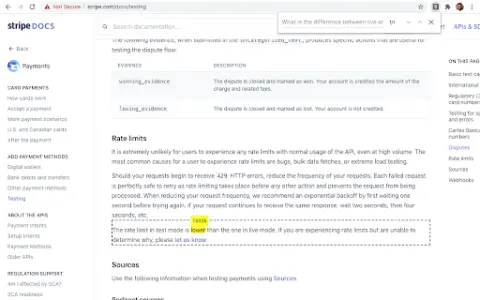
Shift-Ctrl-F is a Chrome extension that utilizes the MobileBERT model, which has been fine-tuned using the SQuAD dataset. This extension uses TensorFlowJS to search for answers on web pages and identify relevant elements. It allows users to enter natural-language queries and find corresponding answers within the content of the current page.
How to use the Shift-Ctrl-F Chrome extension/plugin?
1) Open the extension pop-up window using the toolbar or shortcut key (Shift-Ctrl-F).
2) Enter your natural language query in the search box.
3) Press Enter and wait for the model to return the results.
The core functionality of the Shift-Ctrl-F Chrome extension/plug-in.
Conduct natural language question-and-answer interactions on web pages.
Highlight relevant elements based on the search query.
Efficient processing using MobileBERT
Related
Skin Tone Image Filter
The process of converting the skin tones in an image to grayscale.
PicCraft
AI-driven applications are capable of generating images based on textual instructions and editing existing images as well.
WaveAI – AI Editor
An AI-powered photo and image editor that enables you to easily create stunning visual effects and advertisements.
AI HomeDesign
AI HomeDesign is a real estate photo editing platform that offers five highly sought-after services. With AI, users can instantly convert and enhance their real estate photos.
Giffo
An AI Chrome extension designed to boost productivity, featuring OCR, smart chat, and image generation capabilities.
AI Album Cover
Artwurk provides free AI-generated images for artists’ album or single covers.