AI TOOL / #05985
Voiceboost – ChatGPT
A Chrome extension designed for voice-controlled interaction with ChatGPT.
Introduction
Chrome extension for voice-controlled ChatGPT interaction.
What is the Voiceboost AI Chrome extension/plug-in?
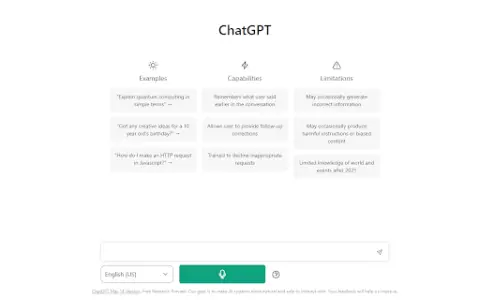
Voiceboost is a Chrome extension that allows users to interact with ChatGPT via voice commands. It adds a button below the input field; by clicking this button, the system captures the user’s verbal inquiries and sends them to ChatGPT for responses. This provides a hands-free alternative for entering text.
How to use the Voiceboost AI Chrome extension/plug-in?
Click the button added below the input area to start recording your voice input. Alternatively, use the keyboard shortcuts: Ctrl+Shift+S (Windows) or Command+Shift+S (Mac) to begin recording, and Ctrl+Shift+E (Windows) or Command+Shift+E (Mac) to stop and submit the recording. Make sure to grant microphone access when prompted.
The core functionality of the Voiceboost AI Chrome extension/plugin
Voice input for ChatGPT
Keyboard shortcuts for voice capture and submission
Related
Whiteboard AI
An AI-powered learning tool used for summarizing lectures, interacting with documents, and creating flashcards.
QuizRise
An artificial intelligence-based quiz generator that makes it easy to create and share quizzes based on a wide range of content.
Revix AI
An AI-powered study tool that creates notes, flashcards, and more from a variety of study materials.
Chat2Anki
Create Anki flashcards instantly from ChatGPT conversations.
Ai To Cards
AI To Cards converts text into study cards that can be used with Anki and other spaced repetition systems.
KardsAI: Flashcard Maker
An AI-powered flashcard creation tool that allows for the rapid and efficient generation of flashcards from various input formats.