AI TOOL / #06632
Talk to GPT
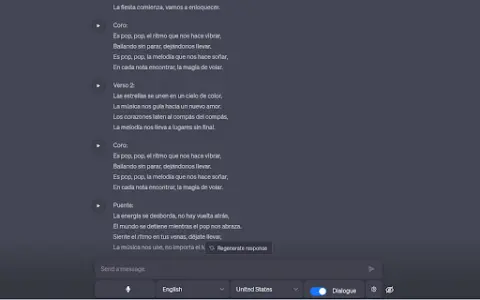
A Chrome extension designed for voice interaction with ChatGPT, supporting multiple languages and error correction features.
Introduction
Chrome extension for voice interaction with ChatGPT, supporting multiple languages and error correction.
What is the Talk to GPT AI Chrome extension/plug-in?
“Dialogue with GPT” is a Chrome extension that enables users to interact with ChatGPT on chat.openai.com via their microphone. It utilizes the browser’s speech recognition API to convert spoken audio into text and supports multiple languages. Users can also adjust the language settings and enable ChatGPT’s error-correction functionality.
How to use the Talk to GPT AI Chrome extension/plug-in?
Install the Talk to GPT Chrome extension. Visit chat.openai.com and use your microphone to utter your query. This extension will transcribe your voice and send it to ChatGPT.
The core functionality of the GPT AI Chrome extension/plug-in.
Provide voice input for ChatGPT.
Multi-language support
Language level adjustment
ChatGPT corrects errors.
Related
Brancher AI
A code-free platform used to connect AI models and build AI-powered applications.
DeepSeek v3
A website that provides access to and information about DeepSeek v3 language models.
GPTs Store Search and Favorite GPTs
A plugin that allows users to easily locate custom GPT models through semantic search.
Trudo AI
A code-free platform used for building OpenAI applications, which offers features for fine-tuning and long-term memory.
AI Personal Assistants – Get More Done
An artificial intelligence personal assistant platform that utilizes multiple AI models to offer a variety of solutions.
Memenome AI
An AI-powered social listening tool, used for analyzing trends on TikTok and identifying popular memes.