AI TOOL / #06688
Vocha | Voice for ChatGPT
Vocha is a voice input extension specifically designed for ChatGPT, with an emphasis on privacy and ease of use.
Introduction
Vocha is a voice-typing extension for ChatGPT with a focus on privacy and ease of use.
What is the Vocha AI Chrome extension/plug-in?
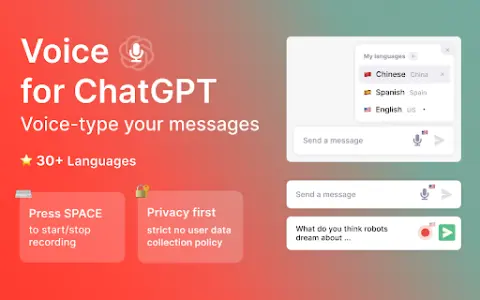
Vocha is a browser extension that allows users to input messages for ChatGPT via voice. It adds a microphone button to the message input field, which can be activated by using the SPACE key or by clicking on it. Vocha places great emphasis on user privacy, strictly adheres to policies that prohibit the collection of user data, and features a clean, minimalist design that ensures seamless integration with the ChatGPT interface.
How to use the Vocha AI Chrome extension/plug-in?
After installing the Vocha extension, a microphone button will appear in the ChatGPT message input box. You can press the SPACE shortcut key or click the microphone button to start and stop recording. You can change the language used for speech recognition by clicking on the flag icon. Remember to grant the microphone access permission during the installation process.
The core functions of the Vocha for Chrome extension/plugin
Provide voice input for messages sent via ChatGPT.
The SPACE shortcut key is used to start/stop recording.
Supports multiple languages (over 30 different languages).
Message editing options (send, edit, or continue recording)
Related
AutoPosts AI
AI tools are used to create and schedule short videos for social media platforms.
AI Speak Subtitles for YouTube
Chrome extension for YouTube that enables real-time voice subtitles, supports translation and customization.
Deepshot
An AI lip-syncing platform used for video translation, correction, and content creation.
Cabina.AI
Manage and interact with all your favorite chatbots effortlessly. Switch between different models seamlessly in one place, while maintaining a shared context to ensure smooth conversations. Compare responses, use ready-made functions to replace lengthy prompts, create artistic works, and convert videos or audio into text, tables, or images. Additionally, you can generate AI voices tailored to various professions to enhance your daily productivity.
Subtitle Genius – Real-time speech recognition and AI-based subtitle translation
SubtitleGenius is an AI-based subtitle translation plugin that helps to overcome language barriers in learning and entertainment scenarios.
Speak Subtitles for YouTube
The text-to-speech engine used for YouTube subtitles utilizes technologies from both Google and Microsoft AI.