AI TOOL / #07222
ReadImage
Extract, edit, and copy text from images on web pages.
Introduction
Extracts, edits, and copies text from images on web pages.
What is Image Text Extractor ai chrome extension/plugin?
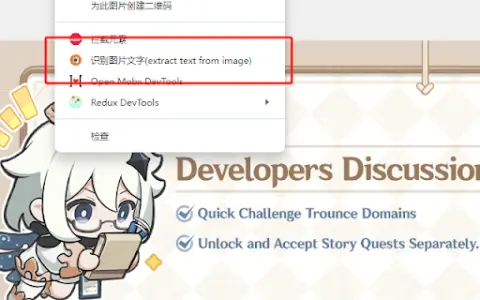
This extension allows users to extract text from images displayed on web pages. It supports common image formats such as jpg, jpeg, png and bmp. After extraction, the text can be edited and copied.
How to use Image Text Extractor ai chrome extension/plugin?
Hover your mouse over the image, right-click and select "Extract text from image". Press "Ctrl + Q" to view the extracted text on the extension page, where it can be edited and copied.
Image Text Extractor ai chrome extension/plugin core features
Extract text from images on web pages
Edit extracted text
Copy extracted text
Related
Strand Book Store
纽约特色独立书店
WEBTOON
Global online comic reading platform
The Authors Guild
Writers' Rights and Publishing Industry Organizations
The Commercial Press
Comprehensive academic and humanities publishing institution
Locus Magazine
Media specialized in science fiction and fantasy literature
GAtrends
AI Trend Radar for Changes in Keyword Usage