AI TOOL / #07462
Vision AI
A Chrome extension that enables AI-driven insights based on screenshot data.
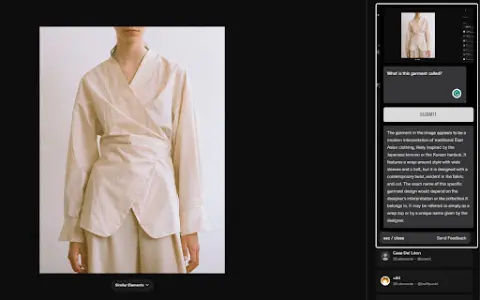
Introduction
Chrome extension for AI-powered insights from screenshots.
What is a Vision AI Chrome extension/plug-in?
Visual AI is a Chrome extension that combines screenshot functionality with AI-driven insights to enhance online information search. It allows users to capture any portion of a web page, add notes or questions, and receive AI-generated responses based on the context of the captured image.
How to use the Vision AI Chrome extension/plug-in?
Install the Visual AI Chrome extension. Use CTRL + SHIFT + Y to take a screenshot, and then add any notes or questions you have. Visual AI will analyze the screenshot and provide an AI-generated response.
The core functions of the Vision AI Chrome extension/plugin
Screenshot capture
Interactive AI Suggestions
Seamless browser integration
Suitable for a wide range of applications in various fields
Privacy and Security
Related
Powell's Books
A well-known independent bookstore in the United States
MANGA Plus
The official manga reading platform of Shueisha
QueryTracker
Platform for Writers and Literary Agents to Search for Each Other
Zhonghua Book Company
Chinese traditional culture and ancient books publishing institutions
The Mysterious Bookshop
An independent bookstore specializing in mystery and detective novels
Qorqbot
A desktop intelligent agent that actively assists you in advancing your work.