AI TOOL / #08846
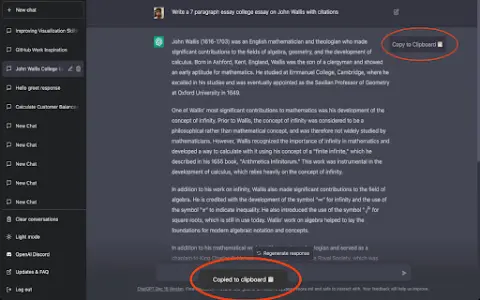
Copy for Chat GPT
An extension used to copy ChatGPT responses and check for plagiarism.
Introduction
Extension to copy ChatGPT responses and check for plagiarism.
What is the Plagiarism Detector Extension for Chrome – an extension/plug-in for Google Chrome?
This extension allows you to copy the responses generated by ChatGPT by clicking a button or using the CMD+K shortcut key, and then have those responses checked by plagiarism detection tools.
How to use the Plagiarism Detector Extension for Chrome?
You can use this extension by clicking the copy button on ChatGPT’s response or by pressing CMD+K. The copied text will be automatically checked to determine whether it contains any plagiarized content.
The core functionality of the Plagiarism Detector Extension for Chrome.
One-click to copy the response from ChatGPT
Use the CMD+K shortcut key to copy.
Automatic plagiarism detection
Related
AI Gift For You
An artificial intelligence-powered gift idea generator that provides personalized recommendations for gifts.
Cool Gift Ideas
An AI-powered tool for personalized, unique gift suggestions.
Cal Mind
An iOS app designed for analyzing the nutritional content of food and providing personalized health management services.
Ready AI Goal + Habit Tracker
An AI-driven coaching platform designed to help individuals develop positive habits and achieve personal growth.
Solid Apps
A set of productivity applications suitable for iOS, iPad, and Mac, available either individually or as a bundle.
My Yogi
Yoga sequence builder and mana...